 AIPrOoHub
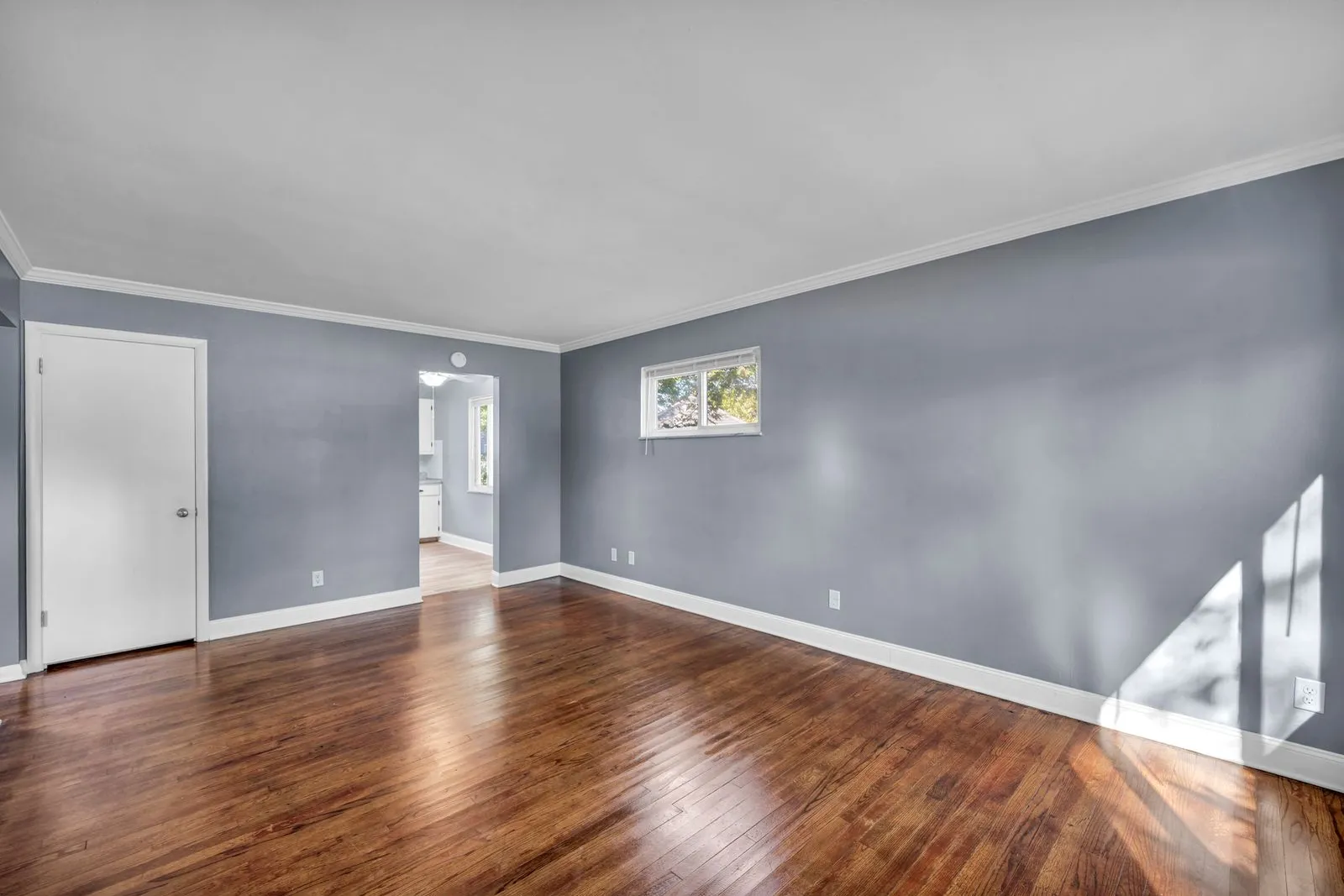
Empty rooms kill buyer interest. AI virtual staging fixes that for about $15 a photo. Here is the practical guide: when it beats physical staging, disclosure rules, which rooms to stage, and copy-paste prompts.
An empty listing photographs like a blank page, and buyers scroll past blank pages. AI virtual staging changes the math on vacant homes: you upload your listing photos and get back the same rooms, furnished and styled, usually within a few hours. This guide covers how to use it the right way: when it beats physical staging, which rooms to stage first, the disclosure rules your MLS probably requires, the mistakes that get agents in trouble, and prompt templates for the copy that should run alongside your staged photos.
What AI Virtual Staging Actually Does
AI virtual staging takes a photo of an empty room and renders furniture, rugs, lighting, and decor into it, matched to the room's geometry, perspective, and light direction. The walls, floors, windows, and architectural features stay exactly as they are. Turnaround is measured in hours, not the days or weeks a physical stager needs.
The boundary that keeps you out of trouble: furniture and decor are fair game, architecture is not. Moving walls, adding windows, changing countertop material, or erasing stains from the floor crosses from staging into misrepresentation. If the buyer cannot experience it when they walk through the door, it should not appear in the staged photo.
When Virtual Staging Beats Physical Staging
Physical staging still wins for luxury listings where the tactile in-person impression matters. For the rest of the market, AI virtual staging wins on cost, speed, and flexibility.
Cost. Physical staging a vacant home runs $2,000 to $5,000 for a one to three month rental, plus delivery and setup. AI virtual staging runs $15 to $30 per photo, and most listings need six to ten staged photos. That is $90 to $300 total, roughly one tenth the cost.
Speed. A physical stager needs a walkthrough, a design plan, sourcing, and a delivery crew. Two weeks is fast. Virtual staging turns photos around in hours to a day, which matters when you are racing a listing deadline.
Flexibility. You can show the same room two ways, restyle if feedback is flat, and swap finishes to test what resonates. Physical staging locks you into one look for the rental term.
Where physical still wins. Walkthroughs. If most of your showings happen in person and the home will sit vacant for months, physical staging fills the emptiness buyers feel at the door. Virtual staging shines where the first showing happens online, which is where almost every showing starts. Many agents run a hybrid, virtual staging for the online launch and a light physical refresh for open houses.
The Rooms to Stage First
You do not need to stage every room. Put the budget where the emotional decisions happen.
1. The living room
The single most important staged photo in any listing. It is usually the hero image, and it is where buyers imagine their daily life. A staged living room shows scale: where the sofa goes, how the TV wall works. Stage this first, every time.
2. The primary bedroom
An empty bedroom looks small and cold. A staged one with a bed, nightstands, and soft lighting looks like a place to rest.
3. The kitchen eating area
Kitchens photograph well empty, but staging the island stools and breakfast nook shows how the kitchen lives. A few stools are plenty.
4. Dining room and home office
Stage these only if they answer a real question. A formal dining room buyers might mistake for a second living room benefits from a table and chairs. A spare bedroom staged as a home office is smart where remote work drives demand.
5. Skip the bathrooms, laundry, and closets
These rooms read fine empty, and staging them looks odd. Buyers judge them on fixtures and cleanliness. Leave them clean and empty.
Best Practices for Staged Photos That Convert
Match the furniture to the price point. Staging a $180,000 starter home with designer furniture reads as fake. Staging a $1.2 million listing with flat-pack basics reads as cheap. Pick the style the neighborhood would pick.
Keep the scale honest. The most common giveaway of bad virtual staging is furniture that is slightly too small, which makes the room look bigger than it is. Buyers feel the room shrink at the showing and lose trust.
Light it like the real room. Staged lighting should match the photo's actual light direction. A sunny window on the left with furniture shadows falling right looks doctored. Check every photo before it goes live, and draft the matching description with the free Listing Description Generator so the words match what buyers see.
Stage from the same angles as your real photos. Staged photos should be the same shots as your unstaged ones, just furnished. This matters for buyer trust and for MLSs that want an unstaged version alongside the staged one.
Limit the fantasy. One staged photo per room is the norm, and many agents publish both the empty and staged versions of the key rooms. Ten staged photos out of 25 total is plenty. A listing where every photo is staged starts to feel like a rendering, not a home.
Disclosure and Ethics: What Your MLS Requires
Disclosure is the standard. Many MLSs now require virtually staged photos to be labeled, and several state real estate commissions treat undisclosed virtual staging as deceptive advertising. Check your MLS photo policy and state advertising rules before publishing. The direction is uniform: disclose, always.
How to disclose properly. The disclosure should be visible where the photos are, not buried in agent remarks. Use a caption on each staged photo reading "virtually staged," add a note in the public remarks, and show the unstaged version of key rooms alongside the staged ones.
Never edit the structure. Adding furniture is staging. Changing walls, floors, windows, views, or fixtures is misrepresentation. Erasing a crack, removing water stains, or improving the view can bring complaints, fines, and lawsuits. Ask: would the buyer see this walking in with the room empty?
Disclose in the copy too. Your description should not present staged furniture as if it comes with the home. "Gleaming hardwood floors" is fine; "elegant sectional sofa" is not, unless the sofa is actually included.
AI Prompt Templates for Virtually Staged Listings
Staged photos need staged copy. Copy, paste, fill in the brackets.
The staged-room listing description
"Write a 150-word listing description for a [3-bed, 2-bath, 1,900 sq ft] home at [address]. The listing photos are virtually staged. Describe the rooms, layout, light, and architectural features only. Do not describe the furniture, rugs, or decor visible in the photos, since those are staged and not included. Style: warm and specific. Start with the living room, since it is the hero photo. End with the disclosure sentence: 'Some photos are virtually staged to show the home's potential.'"
Why it works: it bakes the disclosure into the description and forces the model to sell the home, not the furniture.
The staged photo caption set
"Write short captions for 6 virtually staged listing photos: living room, kitchen, primary bedroom, dining room, home office, exterior. Each caption is one sentence under 15 words describing the space as shown, ending with the tag '[virtually staged]' on interior shots. Do not mention furniture as if it is included. Keep the tone upbeat and factual."
Why it works: captions are where buyers actually read the disclosure, and short factual captions keep you compliant on portals.
The honesty paragraph for agent remarks
"Write a 2-sentence note for MLS agent remarks disclosing virtual staging for [address]. Sentence 1: state that interior photos are virtually staged to illustrate the home's potential. Sentence 2: invite buyers to tour in person and note that the home is vacant. Keep it professional and under 40 words."
Why it works: compliant remarks copy in seconds, and the in-person invitation turns the disclosure into a showing driver.
The before-and-after social post
"Write an Instagram caption under 100 words for a before-and-after carousel of a virtually staged living room at [address]. Slide 1 is the empty room, slide 2 is the virtually staged version. Hook: most buyers cannot see past empty rooms. State that the staged photo is a digital rendering. End with a call to action to DM for a tour. Add 5 relevant hashtags."
Why it works: before-and-after content is among the highest-engagement formats agents post, and the disclosure keeps the post compliant.
The room-by-room feature bullets
"Write feature bullets for a virtually staged listing at [address], one bullet per room: living room, kitchen, primary bedroom, second bedroom, dining area, backyard. Each bullet names the room's real selling point (size, light, layout, finishes) in under 12 words. No mention of staged furniture. Add a final bullet: 'Photos of select rooms are virtually staged; home is vacant.'"
Why it works: bullets are what buyers skim on portals, and keeping every bullet about the real home makes the whole list honest by construction.
Common Mistakes That Undermine Staged Listings
Over-staging. Staging every room with every surface styled stops looking like a home and starts looking like a catalog. Stage the rooms that matter. Fixer-uppers need the same restraint; see AI Listing Copy for Fixer-Uppers.
Misleading edits. Letting the tool "improve" the room itself is misrepresentation: brighter floors, a view that is not really there, a stain quietly erased. Review every staged photo against the original and reject anything that changed the architecture. For the copy side, the MLS description workflow keeps the words as honest as the photos.
Forgetting the disclosure. Even honest stagers sometimes forget to label the photos. Then a buyer feels misled at the showing over something a caption would have prevented. Disclosure takes two minutes. Never skip it.
Staging bad photos. Virtual staging cannot fix a dark, crooked source photo. The AI works from the photo's geometry and lighting, so bad inputs produce renders that look wrong. Shoot the empty rooms properly first: daylight, straight verticals, wide but honest angles.
Describing the furniture in the copy. "Imagine sinking into the plush sectional" is a problem when there is no sectional. Every sentence should survive the empty-room test: if it is still true in the vacant room, keep it.
Frequently Asked Questions
How much does AI virtual staging cost?
Most services charge $15 to $30 per photo, and a typical listing needs six to ten staged photos, so budget $90 to $300 total, roughly one tenth the cost of physical staging.
Do I have to disclose virtually staged photos?
In most markets, yes. Many MLSs explicitly require virtually staged photos to be labeled, and state advertising rules generally treat undisclosed digital alterations as deceptive. Disclose on the photo itself and in the remarks.
Which rooms should I virtually stage first?
The living room, the primary bedroom, and the kitchen eating area, in that order. Skip bathrooms, laundry rooms, and closets; they read fine empty.
Can AI virtual staging change walls, floors, or views?
The tools can, but you should not let them. Changing the structure of the room crosses from staging into misrepresentation and can trigger MLS violations and legal complaints. Stage with furniture and decor only.
Will buyers feel misled when they tour an empty home?
Not if you disclosed properly. Buyers understand virtual staging when it is labeled; what angers them is surprise. Showing the unstaged version of key rooms alongside the staged ones eliminates the surprise.
Is virtual staging as effective as physical staging?
For online marketing, where nearly every buyer journey starts, virtually staged listings consistently outperform empty ones on views and showing requests. Physical staging still wins for the in-person experience at luxury price points. Many agents use both.
The Shortcut
The prompts above cover staged listings, but they are a fraction of what listing marketing takes: descriptions, captions, emails, remarks, social posts, and follow-ups for every property. The AI Prompt Pack for Real Estate Agents puts 200+ copy-paste prompts in one place, organized by task, so the whole marketing package for a listing takes minutes instead of hours.
Get the AI Prompt Pack, $39, instant download →
Related reading: How to Write MLS Descriptions With AI: Step-by-Step (2026) · AI for Luxury Listing Copy: Words Worthy of the Property (2026) · Zillow and Redfin Listing Optimization With AI (2026) · AI Listing Copy for Fixer-Uppers (2026)
Get the AI Prompt Pack, $39, one time (opens in new tab). 209 prompts that write listings, ads and follow-ups like these, ready to paste.