The AI Prompt Pack is live: find the right prompt in seconds, $39 one time. Try 15 prompts free

AIPrOoHub Get the Pack, $39Get the Pack (opens in new tab) Free 15-prompt sample
The AI Prompt Pack for Real Estate Agents

AI Prompt Pack for real estate agents: stop staring at a blank screen

$39 one-time payment

Instant PDF download. 30-day money-back guarantee.

Commercial license, $68 (opens in new tab)
Works with free ChatGPT, Claude and Gemini One-time payment, no renewal
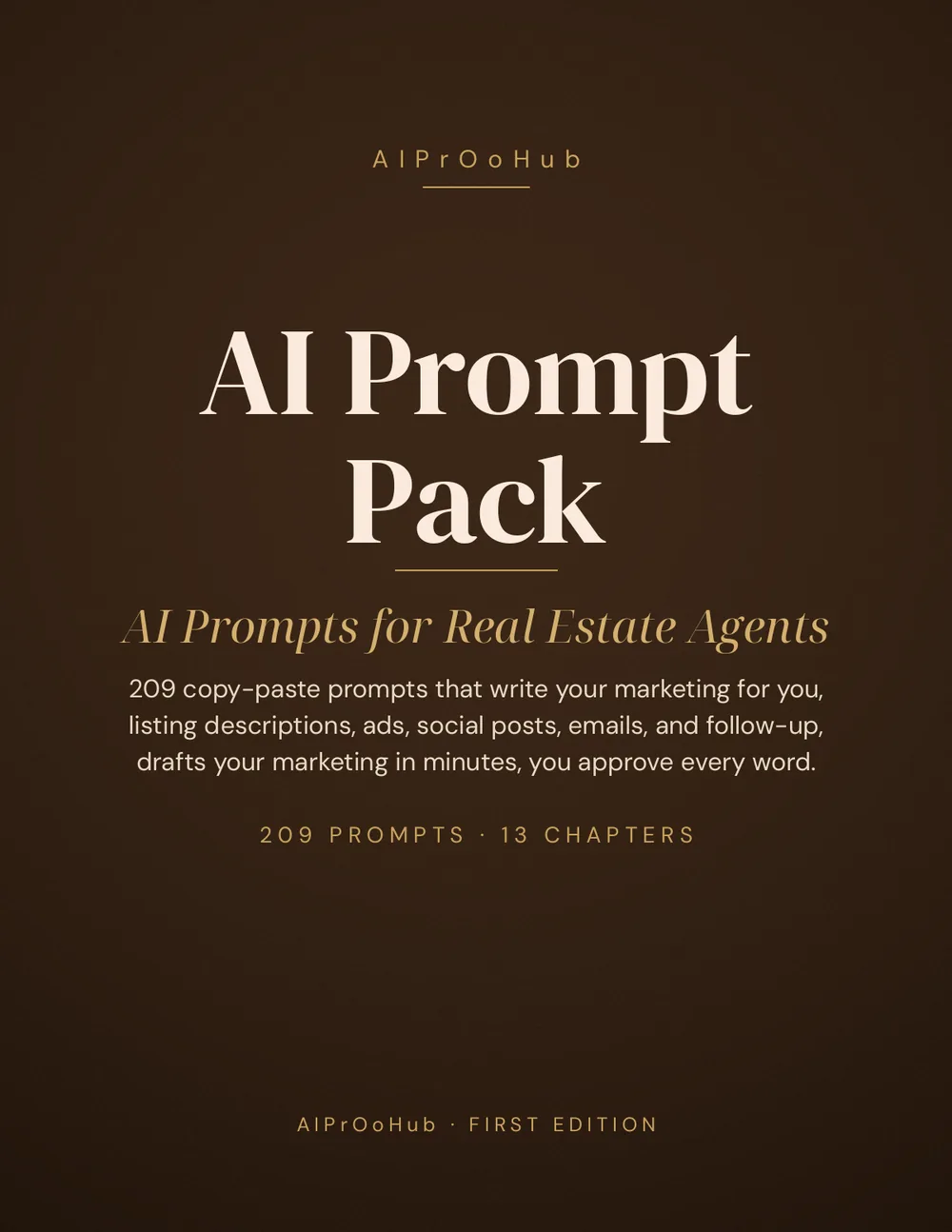
Cover of the AI Prompt Pack for Real Estate Agents by AIPrOoHub
Find it in seconds Instant PDF download
30-day money-back guarantee

The AI Prompt Pack for Real Estate Agents is a quick-reference system for agents who write their own marketing. Find the right prompt in seconds, copy, paste, fill in the brackets, and publish a listing description, ad, or email sequence in minutes, not evenings. Every property-facing prompt describes the property, not the people, and you can run your draft through the free Fair Housing Compliance Checker before you publish. Our fair-housing-safe listing copy guide explains the rules behind it. The system holds 209 copy-paste AI prompts in 13 chapters, in a 378 page PDF. Personal is $39, one-time payment, and Commercial is $68.

One pack. Every marketing job in your week.

209
Copy-paste prompts
13
Chapters
378
Pages
$39
One-time payment

Eight chapters contain numbered prompts. Five additional chapters provide implementation guides, prompt chains, and measurement workflows.

01 Look inside

See the product before you pay for it

Real pages and a real prompt from the pack. Every prompt ships with the prompt itself, a filled example, what good output looks like, and a coaching note.

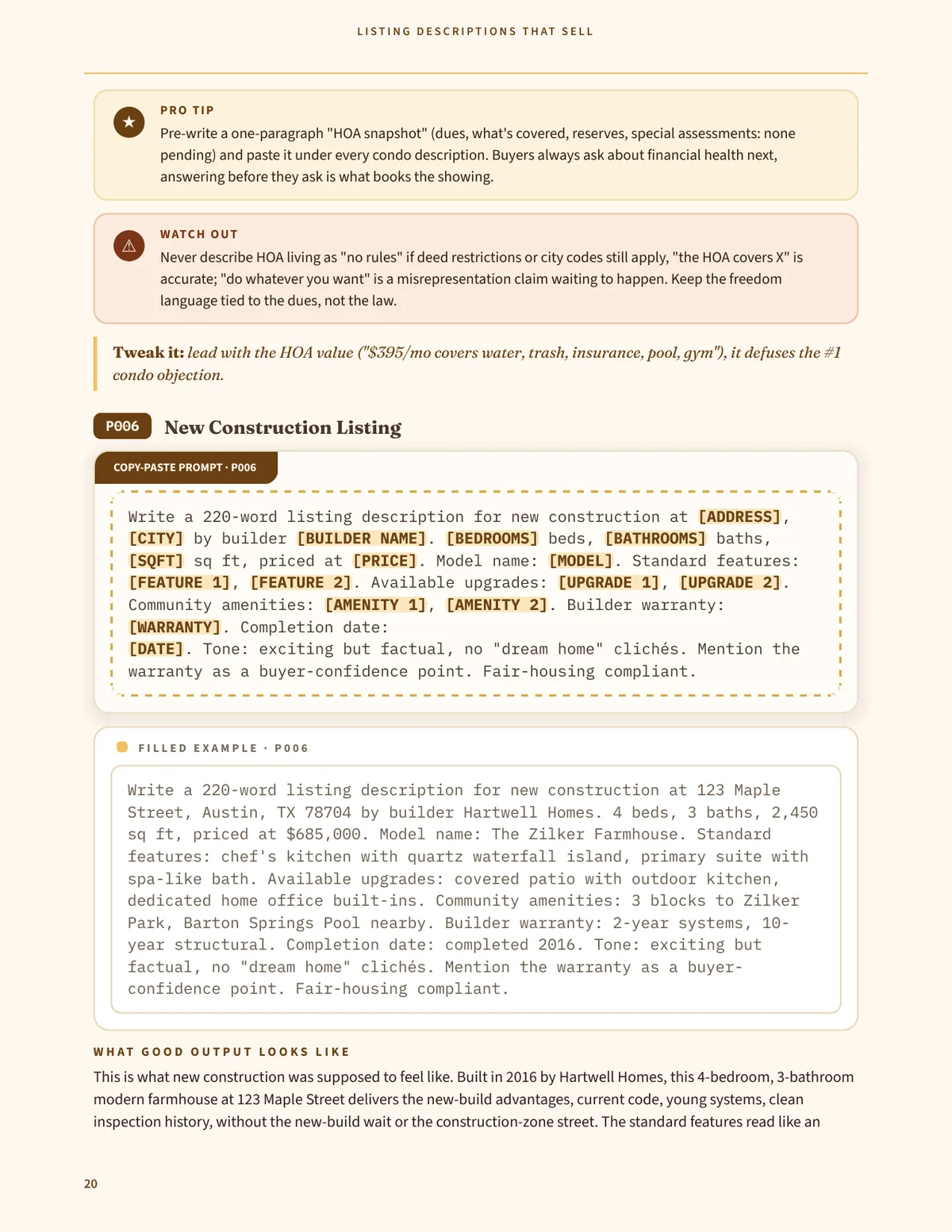
Page 20 of the pack, showing prompt P006, New Construction Listing, with its copy-paste prompt box, its filled example and the start of the what good output looks like section
Figure 01 Prompt P006 inside the pack: the copy-paste prompt, a filled example and the output it should produce. Tap the page to read it full size
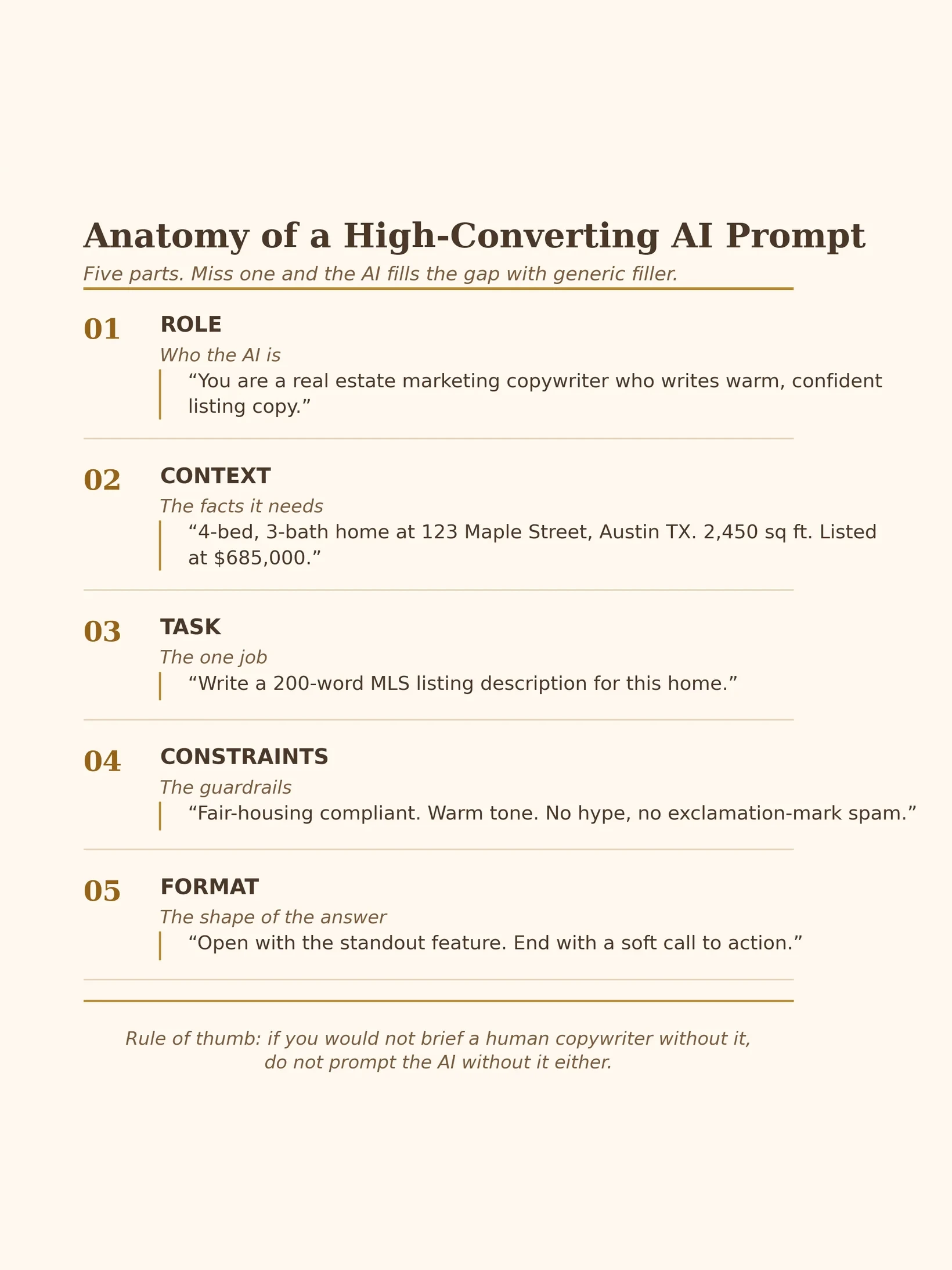
Diagram from the pack titled Anatomy of a High-Converting AI Prompt, listing the five parts of a complete prompt: role, context, task, constraints and format, each with a short example
Figure 02 The anatomy diagram from the pack: the five parts every complete prompt in the pack is built from. Tap the diagram to read it full size
See inside the pack

Four real pages from the pack

Direct renders of the PDF. No page was redrawn or mocked up.

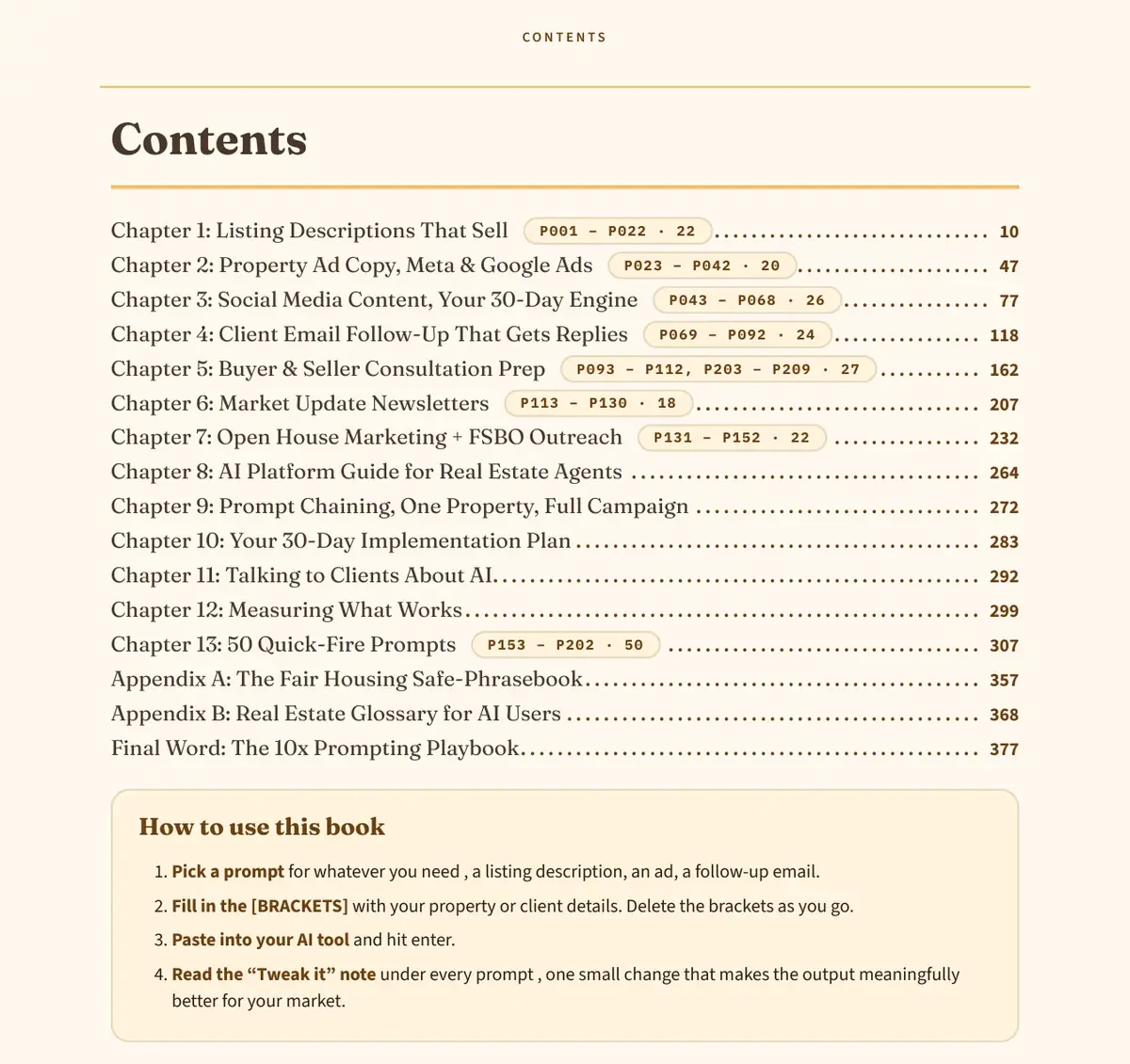
Contents page of the AI Prompt Pack, listing all 13 chapters and their prompt ranges
Figure 03 The contents page, PDF page 3: all 13 chapters and where each prompt range sits.
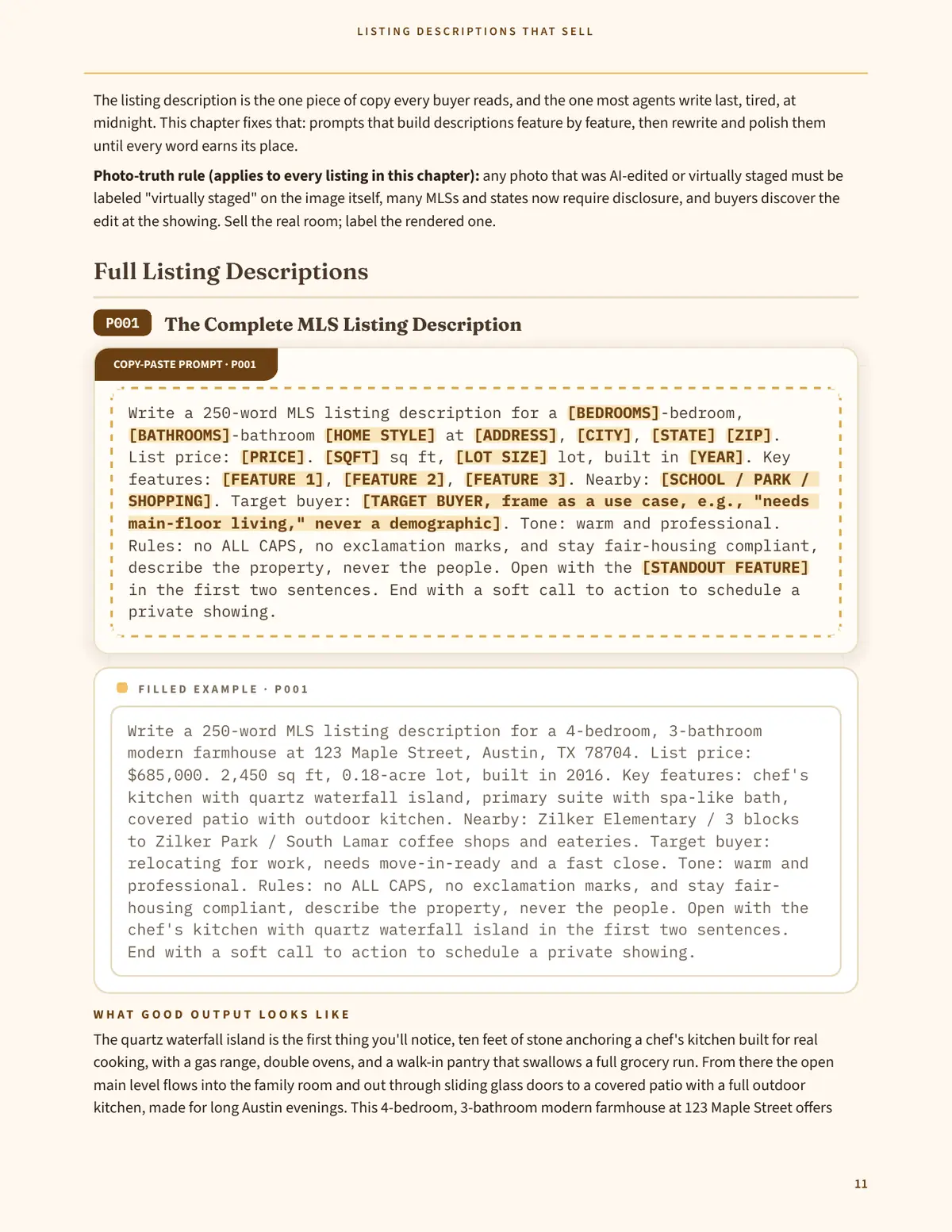
Page 11 of the pack, showing prompt P001, The Complete MLS Listing Description, with its copy-paste prompt box and the start of its filled example
Figure 04 Prompt P001, PDF page 11: the full copy-paste prompt with its rules, plus the start of its filled example.
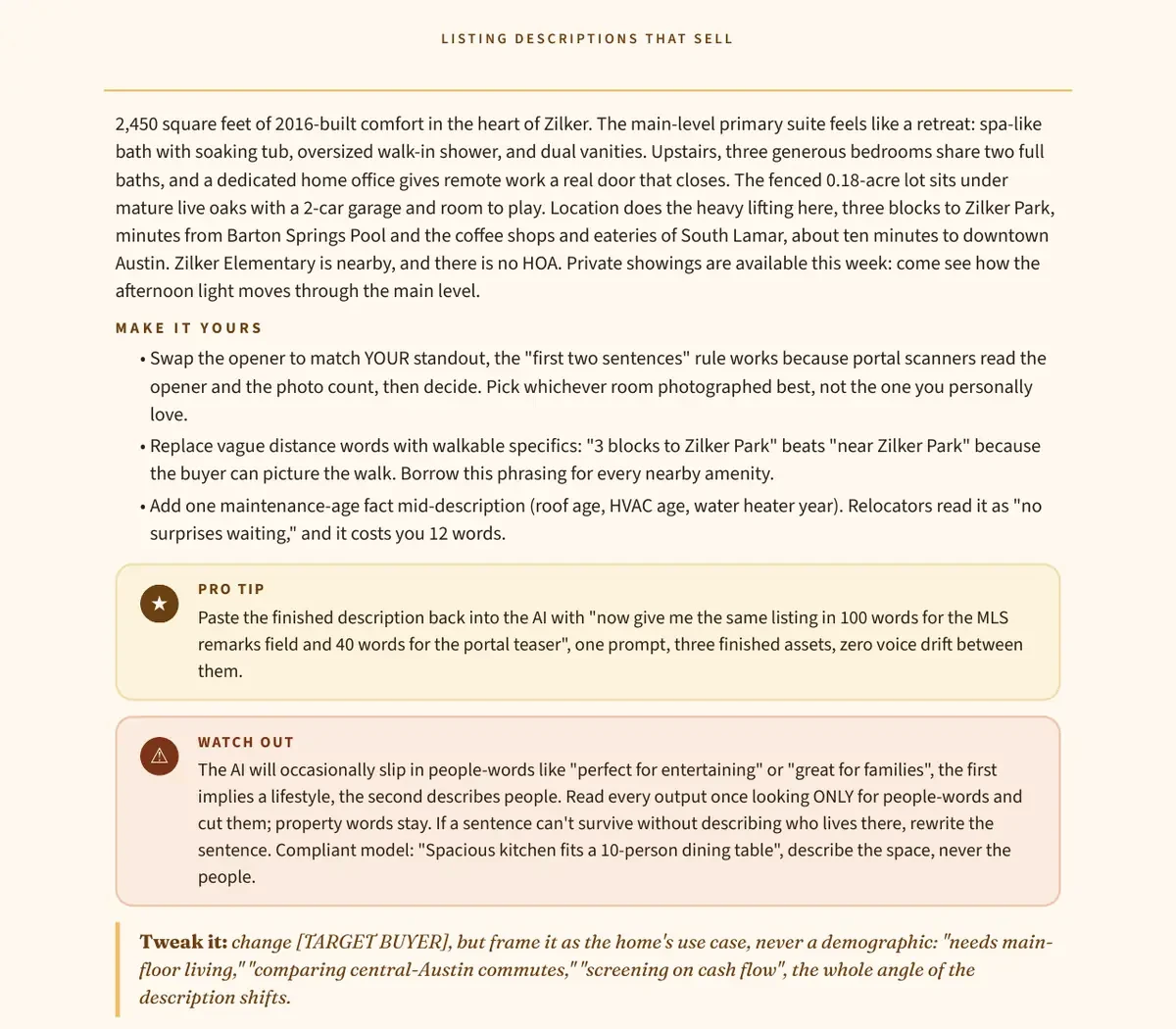
Page 12 of the pack, showing the rest of the example output for prompt P001, with the Make It Yours notes that follow it
Figure 05 Example output for P001, PDF page 12: the rest of the finished listing the filled example produces, with the Make It Yours notes that follow it.
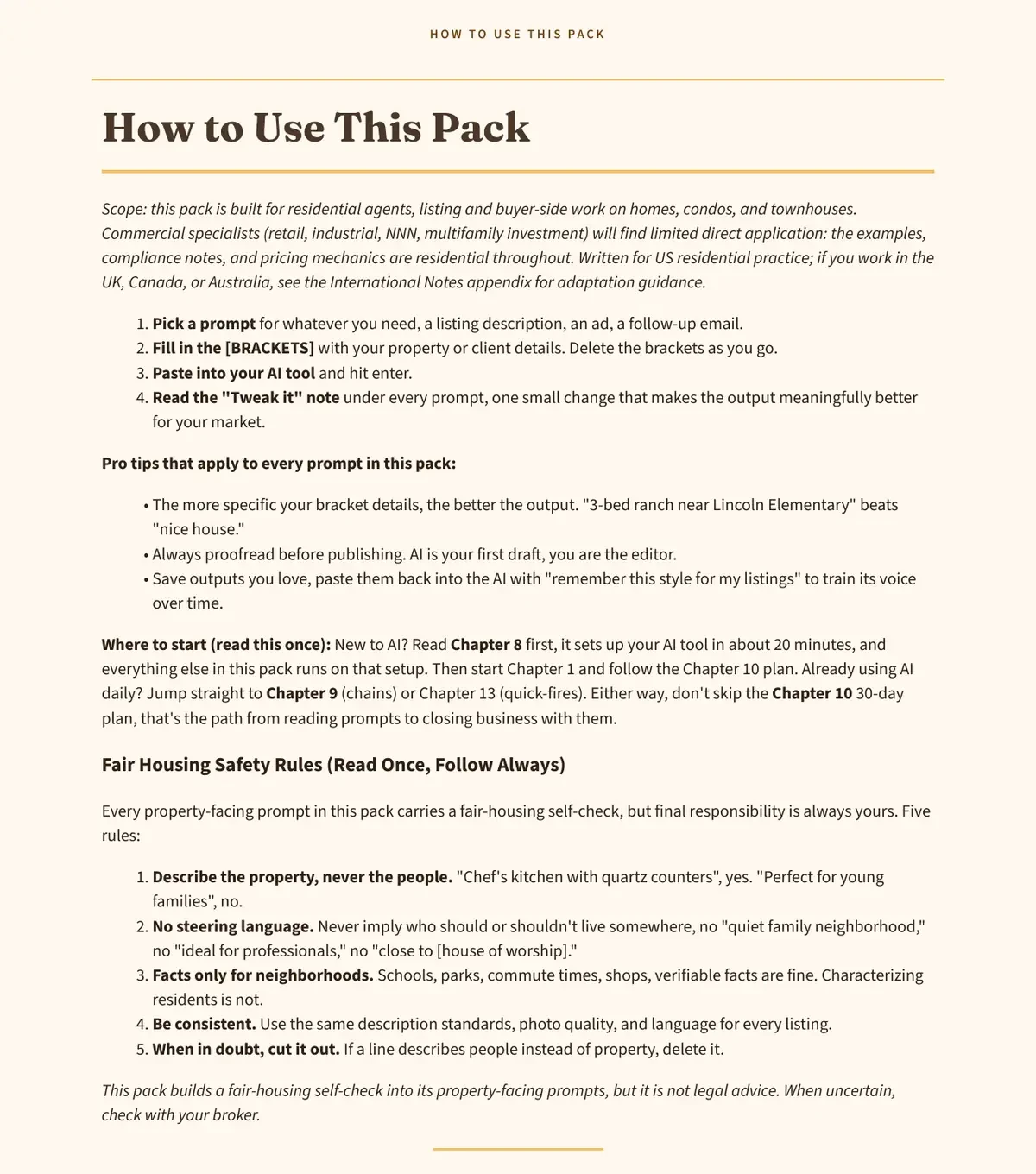
Page 2 of the pack, How to Use This Pack, showing the four steps: pick a prompt, fill in the brackets, paste it in, and read the Tweak it note
Figure 06 How to customize a prompt, PDF page 2: pick a prompt, fill in the brackets, paste it in, then read the Tweak it note under every prompt.

Screenshots are direct renders of the PDF (378 pages). The sample above is the same pack you buy.

Inside the pack, at a glance

  • Each prompt is a complete workflow, with the prompt itself, a filled example, what good output looks like, and a "Tweak it" coaching note. The system holds 209 prompts in 13 chapters, in a 378 page PDF.
  • Biggest chapters: Consultation Prep (27 prompts), Social Media Content (26), Client Email Follow-Up (24).
  • Chapter 13: 50 quick-fire prompts for headlines, hooks, captions and one-line replies.

See all 13 chapters

  1. 1 Before
  2. 2 Prompt
  3. 3 After

Step 1, Before

Before: a typical rushed first draft. Illustrative example, not a real listing.

Beautiful home in a great location! This 4 bed, 3 bath house has everything you need. Large kitchen, nice bedrooms, and a covered patio. Close to schools and shopping. Must see! Call today for a showing.

36 words. No price, no address, no detail a buyer can use.

Step 2, The prompt

The prompt: P001, The Complete MLS Listing Description, from the pack.

Read the full prompt, P001
Prompt P001 - The Complete MLS Listing Description, Chapter 1. The prompt is in the free 15-prompt sample. The filled example and example output below are from the full pack. Write a 250-word MLS listing description for a [BEDROOMS]-bedroom, [BATHROOMS]-bathroom [HOME STYLE] at [ADDRESS], [CITY], [STATE] [ZIP]. List price: [PRICE]. [SQFT] sq ft, [LOT SIZE] lot, built in [YEAR]. Key features: [FEATURE 1], [FEATURE 2], [FEATURE 3]. Nearby: [SCHOOL / PARK / SHOPPING]. Target buyer: [BUYER NEED, as a use case tied to the property, e.g. "needs main-floor living," never a demographic]. Tone: warm and professional. Rules: no ALL CAPS, no exclamation marks, and stay fair-housing compliant, describe the property, never the people. Open with the [STANDOUT FEATURE] in the first two sentences. End with a soft call to action to schedule a private showing.

Filled example:

Write a 250-word MLS listing description for a 4-bedroom, 3-bathroom modern farmhouse at 123 Maple Street, Austin, TX 78704. List price: $685,000. 2,450 sq ft, 0.18-acre lot, built in 2016. Key features: chef's kitchen with quartz waterfall island, primary suite with spa-like bath, covered patio with outdoor kitchen. Nearby: Zilker Elementary / 3 blocks to Zilker Park / South Lamar coffee shops and eateries. Target buyer: needs a kitchen built for cooking and hosting, and a walkable spot near the park. Tone: warm and professional. Rules: no ALL CAPS, no exclamation marks, and stay fair-housing compliant, describe the property, never the people. Open with the chef's kitchen with quartz waterfall island in the first two sentences. End with a soft call to action to schedule a private showing.

Tweak it: Swap the opener to match YOUR standout: put the strongest detail in the first two sentences, where a reader decides whether to keep reading. Pick whichever room photographed best, not the one you personally love.

How to fill P001 safely. The "Target buyer" field must describe the property and lifestyle fit, never a protected characteristic. Write a property-tied use case, such as "needs main-floor living" or "needs a kitchen built for cooking and hosting." Do not fill it with a demographic, an age group, a family type, or any other description of people. School names must be stated factually (assigned schools plus district source) or omitted, never as a quality claim ("top-rated", "best schools"). Check every fact, including school assignment and distance, before you publish, and run the finished draft through the Fair Housing Compliance Checker.

Copy, paste, fill in the brackets.

Step 3, After

After: the finished listing, written only from the facts in the prompt.

The chef's kitchen sets the tone in this 4-bedroom, 3-bathroom modern farmhouse at 123 Maple Street, Austin, TX 78704. A quartz waterfall island anchors a kitchen built for cooking and hosting, and it gives the room its shape and its warmth.
Read the full finished listing
The chef's kitchen sets the tone in this 4-bedroom, 3-bathroom modern farmhouse at 123 Maple Street, Austin, TX 78704. A quartz waterfall island anchors a kitchen built for cooking and hosting, and it gives the room its shape and its warmth. The island gives the cook room to work while guests gather close by, so the kitchen stays part of every gathering rather than apart from it. Listed at $685,000, the home offers 2,450 square feet on a 0.18-acre lot, built in 2016. The primary suite pairs with a spa-like bath, a quiet retreat at the end of the day. The three additional bedrooms share two more bathrooms, so mornings stay simple for a full household. Outside, a covered patio with an outdoor kitchen extends the living space into the open air, a place for morning coffee and evening meals without leaving the house. Cooking moves outside when the weather allows, and the patio keeps the gathering going after the meal. Zilker Elementary is nearby, and Zilker Park sits 3 blocks away, close enough for a walk on foot. South Lamar coffee shops and eateries sit a short walk away, so a morning coffee or an evening meal out is close by. Schedule a private showing to walk through 123 Maple Street and see it for yourself.

Example output from the book. Every property fact in this output comes from the facts in the prompt. The descriptive wording is the writer's own. Check every fact before you publish.

School note: if you name a school, name the assigned school and its district source, or leave the school out.

217 words. One finished draft.

One prompt, one finished draft. You fill in the brackets, then edit the result in your own voice.

What changed

  • Specific details replace vague claims: quartz waterfall island, 2,450 sq ft, 3 blocks to Zilker Park, instead of large kitchen and great location.
  • A structure replaces a list: the after text opens on the standout feature and ends with a showing call to action, as the prompt instructs.
  • The prompt's own rules are followed: no ALL CAPS, no exclamation marks, property described, never the people.

Two more prompts from the pack

Both prompts below are in the book: P074 in Chapter 4 and P043 in Chapter 3. Each one ships the same way as P001, with a filled example, expected output, and a coaching note.

P074, Post-Showing Follow-Up, Chapter 4: Client Email Follow-Up

The prompt:

Write a post-showing follow-up email to [NAME] after touring [ADDRESS]. Reference something specific they liked ([LIKED]) and their concern ([CONCERN]). Address the concern honestly ([YOUR TAKE]). Next step options: second showing, offer discussion, or keep looking, let them choose. Under 160 words.

Filled example:

Write a post-showing follow-up email to [BUYER FIRST NAME] after touring 123 Maple Street. Reference something specific they liked (the chef's kitchen with its quartz waterfall island and the covered patio with its outdoor kitchen) and their concern (whether the 0.18-acre lot leaves enough outdoor room). Address the concern honestly (the covered patio extends the living space outdoors, and Zilker Park sits 3 blocks away). Next step options: second showing, offer discussion, or keep looking, let them choose. Under 160 words.

What good output looks like:

Subject: Thoughts on Maple Street?

Hi [BUYER FIRST NAME], thank you for touring 123 Maple Street with me. The chef's kitchen with its quartz waterfall island stood out, and the covered patio with its outdoor kitchen gave the tour a clear highlight. You asked whether the 0.18-acre lot leaves enough outdoor room. My honest take is that the covered patio extends the living space outdoors, and Zilker Park sits 3 blocks away when you want open space beyond the lot. Your next step is yours to choose: a second showing, a talk about offer strategy, or keep looking. No pressure either way. What are you thinking?

The follow-up system behind this prompt is covered in our guide to real estate email sequences with AI.

101 words. Buyer details stay in brackets, so nothing is invented about a real buyer.

Tweak it: Send it within 2 hours of the showing, while the feeling is fresh. Name the exact thing they lingered at, and always offer all three next steps, including keep looking. Buyers who feel no pressure reply faster and more honestly.

P043, 30-Day Content Calendar, Chapter 3: Social Media Content

The prompt, core instruction:

Build a 30-day social media calendar for an agent in [CITY], posting [X] times per week on [PLATFORM]. Content mix: 40% listings/local market, 30% educational, 20% personal/behind-the-scenes, 10% engagement/fun. For each post give: date, post type, the hook line WRITTEN OUT (not a topic), the local anchor (the specific number, street, listing, or client question tying it to [CITY]), and the goal (leads, authority, engagement).

Filled example:

Build a 30-day social media calendar for an agent in Austin, posting 4 times per week on Instagram. Content mix: 40% listings/local market, 30% educational, 20% personal/behind-the-scenes, 10% engagement/fun.

What good output looks like, 12 posts from the 30 days:

  • Day 1, Listing Reel: "The island that runs this kitchen." Anchor: the chef's kitchen with its quartz waterfall island at 123 Maple Street, listed at $685,000. Goal: leads.
  • Day 3, Market update: "The question I got asked most this week: is now a good time to list in 78704?" Anchor: a buyer question about the 78704. Goal: authority.
  • Day 5, Educational carousel: "4 beds, 3 baths, 2,450 sq ft, built in 2016: what to check room by room at a showing." Anchor: the 123 Maple Street facts. Goal: authority.
  • Day 7, New listing teaser: "A new listing goes live Friday, and the kitchen is the reason to watch for it." Anchor: the upcoming listing. Goal: leads.
  • Day 9, Educational post: "3 questions to ask before you make an offer." Anchor: a question from a buyer at last week's open house. Goal: authority.
  • Day 11, Neighborhood post: "The walk from 123 Maple Street to Zilker Park, 3 blocks, on foot." Anchor: 3 blocks to Zilker Park. Goal: leads.
  • Day 13, Open house invite: "Tour 123 Maple Street, kitchen first, patio second." Anchor: 123 Maple Street, $685,000. Goal: leads.
  • Day 15, Market update: "What changed on South Lamar this month, and what it means if you are thinking of selling." Anchor: South Lamar. Goal: authority.
  • Day 17, Educational post: "Primary suite, spa-like bath: how to judge a bathroom at a showing." Anchor: the primary suite at 123 Maple Street. Goal: authority.
  • Day 19, Stories Q and A: "Ask me anything about buying in 78704, answered with the numbers I actually use." Anchor: the 78704. Goal: engagement.
  • Day 22, Client story: "The question a buyer asked me at last week's open house, and the honest answer." Anchor: the open house. Goal: engagement.
  • Day 25, Personal post: "What a month of showings taught me: buyers decide in the kitchen, then justify it with the numbers." Anchor: the month's showings. Goal: authority.

Tweak it: Run the filler test on every post. If the same post could run for an agent in another city with only the city name swapped, rewrite it around a real Austin anchor or delete it.

Why pay $39 when ChatGPT is free?

ChatGPT is free. Writing the prompts is the work. This pack is a quick-reference system, already written and organized by chapter, so you find the right prompt in seconds, paste one, fill in the brackets, and edit the result in your own voice. The system holds 209 prompts in 13 chapters, each with a filled example and wording that keeps the focus on the property, never the people.

  • A full system, written and organized by chapter, not a blank box to stare at. The counts are 209 prompts in 13 chapters, with 50 quick-fire prompts in Chapter 13.
  • Every prompt ships with a filled example so you can see what good output looks like.
  • Fair-housing aware wording built into the prompts, so you describe the property, never the people. Every property-facing prompt carries a fair-housing self-check, and the pack includes a plain-English safe-phrasebook in Appendix A. Run any draft through the free Fair Housing Compliance Checker before you publish.
  • 50 quick-fire bonus prompts for headlines, hooks, and one-line replies.

Same listing, same facts: a bare prompt vs a pack prompt

Both outputs below use the same facts: the 123 Maple Street listing from the demo above. The left side shows typical bare-prompt output. The right side is the P001 prompt and the rebuilt output already shown above.

Bare prompt

Write a listing description for a 4-bedroom, 3-bathroom modern farmhouse at 123 Maple Street, Austin, TX 78704. List price: $685,000. 2,450 sq ft, 0.18-acre lot, built in 2016. Key features: chef's kitchen with quartz waterfall island, primary suite with spa-like bath, covered patio with outdoor kitchen. Nearby: Zilker Elementary / 3 blocks to Zilker Park / South Lamar coffee shops and eateries.

Stunning 4-bedroom, 3-bathroom modern farmhouse at 123 Maple Street, Austin, TX 78704. This beautiful home has a chef's kitchen with quartz waterfall island, a primary suite with spa-like bath, and a covered patio with outdoor kitchen. It is 2,450 sq ft on a 0.18-acre lot, built in 2016, listed at $685,000. Near Zilker Elementary, 3 blocks to Zilker Park, and South Lamar coffee shops and eateries. This gem will not last long. Schedule your private tour today before it is gone.

One flat draft: every fact listed, none of them shaped.

Pack prompt P001

The full P001 prompt, with its filled example, is in the demo above. It asks for a 250-word description, names the price, size, lot, year, three key features, nearby places, and the target buyer as a use case, and it sets rules: no ALL CAPS, no exclamation marks, and fair-housing compliant, describe the property, never the people.

The chef's kitchen sets the tone in this 4-bedroom, 3-bathroom modern farmhouse at 123 Maple Street, Austin, TX 78704. A quartz waterfall island anchors a kitchen built for cooking and hosting, and it gives the room its shape and its warmth.

Full listing: 217 words. Read the full output in the demo above.

What differs

  • Same facts, different use: both prompts received the price, size, lot, year, three key features, and nearby places. The pack output builds the listing around the standout feature and gives each fact a job. The bare-prompt output lists the facts flat, then leans on praise and urgency to fill the gaps.
  • Structure: the pack output opens on the standout feature and ends with a showing call to action, as the prompt instructs. The bare-prompt output is a list of facts with no structure and no closing step beyond hurry.
  • Fair-housing wording: the pack prompt requires describing the property, never the people, and the pack output does that. The bare-prompt output leans on praise and urgency instead, and gives you nothing to check it against.

This comparison shows only what is on this page: two outputs for the same listing. It makes no wider claim about the model or about other prompts.

Free tool vs the pack: one job vs the whole week

The free Listing Description Generator does one job: a form UI that writes a single listing description. It is a taste of the system, and it stays free and ungated. The pack is the complete system: 209 prompts across 13 chapters covering listings, ads, social content, email follow-up, consultation prep, newsletters, and open house and FSBO work, so the whole week's marketing runs from one place. Use the free tool for one listing. Use the pack when you want the full workflow library.

Get the free 15-prompt sample (opens in new tab)

See a sample prompt

02 What is inside

Every marketing job in your week, in one system. No filler by design.

Paste a prompt into your favorite AI tool, fill in the brackets, and get finished marketing. The system holds 209 prompts in 13 chapters.

01 Chapter 1: Listing Descriptions That Sell

(22 prompts)

MLS-ready descriptions, headlines, openers and rewrites, fair-housing aware from the first draft.

02 Chapter 2: Property Ad Copy

(20 prompts)

Facebook and Instagram ads, Google search ads, retargeting and price-drop ads that pre-qualify clicks.

03 Chapter 3: Social Media Content

(26 prompts)

Content calendars, captions, Reel scripts and DM templates, planned across a full month of posts.

04 Chapter 4: Client Email Follow-Up

(24 prompts)

Buyer nurture, seller updates, past-client referral and prospecting sequences that sound like you.

05 Chapter 5: Consultation Prep

(27 prompts)

Discovery scripts, CMA narratives, listing presentation outlines and objection handling for both sides.

06 Chapter 6: Market Update Newsletters

(18 prompts)

Monthly market updates, rate explainers and hyperlocal content your farm will actually read.

07 Chapter 7: Open House and FSBO

(22 prompts)

Event promotion, sign-in follow-up and respectful FSBO outreach for homes selling without an agent.

08 Chapter 8: AI Platform Guide

(playbook chapter)

Set up ChatGPT, Claude or Gemini with custom instructions, voice settings and privacy rules first.

09 Chapter 9: Prompt Chaining

(playbook chapter)

Linked prompt chains that turn one listing into a full campaign: description, ads, posts and emails.

10 Chapter 10: 30-Day Implementation Plan

(playbook chapter)

A day by day plan that schedules the pack into your week, from first prompt to a full system.

11 Chapter 11: Talking to Clients About AI

(playbook chapter)

Plain language for disclosing AI help, answering client questions and documenting your process.

12 Chapter 12: Measuring What Works

(playbook chapter)

Simple trackers for replies, clicks and appointments, plus a monthly review of what earned its keep.

13 Chapter 13: Quick-Fire Prompts

(50 prompts)

Short, tactical prompts for headlines, hooks, captions and one-line replies when you need copy fast.

How the counts work

Chapters 1 to 7 hold 159 numbered prompts and Chapter 13 holds 50, totalling 209. Chapters 8 to 12 are playbook chapters: guides, chains and plans that carry no numbered prompts.

Chapter counts: Listing Descriptions 22, Property Ad Copy 20, Social Media Content 26, Client Email Follow-Up 24, Consultation Prep 27, Market Update Newsletters 18, Open House and FSBO 22, Quick-Fire Prompts 50.

Why this pack is different

  • [BRACKET] placeholders in every prompt: drop in your address, price and details.
  • "Tweak it" coaching notes: one small change per prompt that makes the output noticeably better.
  • Written for US real estate practice: MLS, Zillow, CMA, FSBO, escrow, open houses. The checker screens copy against a US federal fair housing baseline.
  • Fair-housing aware: every property-facing prompt describes the property, never the people, with a fair-housing self-check built in, plus a plain-English safe-phrasebook in Appendix A. Always run the free Fair Housing Compliance Checker on your draft before publishing. It is your safety net, not a substitute for your own review.
  • No filler by design: every prompt does a specific job.

Who this is for: listing agents, buyer's agents and teams who want to market more homes in less time without hiring a copywriter.

Who this is not for: anyone looking for generic motivational quotes. If a prompt does not do a specific job, it is not in here.

03 Watch the style

"We need to think about it," handled

A look at the objection handling style the pack teaches: name the real concern, solve it, and move the conversation forward.

Instant PDF download. 30-day money-back guarantee.

Read the video transcript and chapter breakdown

Chapter 5: Consultation prep

27 prompts for discovery questions, CMA narratives, pricing conversations and objection handling.

Chapter 13: Quick-fire replies

50 short prompts for headlines, hooks, CTAs and one-line replies for the moments between appointments.

Chapter 4: Email follow up

24 prompts for buyer nurture, seller updates and past-client sequences that keep conversations alive.

Chapter 9: Prompt chaining

Chains that turn one listing into a full campaign: description, ads, social posts, emails and follow up.

Video transcript

This video has spoken narration. A voiceover reads the lines below in full over a music bed, and the on-screen text cards show the same lines. Captions are also available on the video itself.

[00:00] The objection every agent hears: "We want to think about it." Here's what to say.

[00:04] Most agents reply: "Okay, take your time!" The hesitation goes unnamed, and the prospect leaves with the concern still unaddressed.

[00:09] Say this instead: "Of course. What specifically do you want to think through?" 1. The price. 2. The timing. 3. The house itself.

[00:15] "Thinking about it" often means one concern is still open. Ask what they would like to think through, then help them decide on a useful next step.

[00:20] The pack's objection chapter has a response for every version of this.

[00:23] Two hundred nine AI prompts for agents. AIPrOoHub.

Download the transcript as a text file

04 Pricing

Two tiers. One payment.

Find the right prompt in seconds and publish the whole week's marketing in minutes. Personal is for one agent using the pack in their own business, including their own client listings. Commercial adds sharing the pack with five authorized users in total, including the purchaser, within one real estate brokerage or business.

Commercial

For teams and paid client work

$68 one-time payment$13.60 per person, five users total including you

  • $29 more than Personal, one time
  • Everything in Personal
  • Use the prompts in paid client work
  • Share with five authorized users in total, including you, one brokerage
  • Reselling or redistributing the pack itself is not included
Commercial license, $68 (opens in new tab)

Covered by the 30-day money-back guarantee.

Try before you buy: get the free 15-prompt sample

What you getPersonal $39Commercial $68
Prompts209209
Chapters1313
Use in your own businessIncludedIncluded
Use in paid client workIncludedIncluded
Share with five authorized users in totalNot includedIncluded
30-day money-back guaranteeIncludedIncluded

Instant download right after checkout, a beautifully formatted PDF with a short guide on how to use it. Reselling or redistributing the pack itself is not included in either tier.

What you get when you buy

  • The full prompt system as an instant PDF download, 209 prompts in 13 chapters, plus the short guide that walks you through your first prompt step by step.
  • Your copy stays in your Gumroad library, so you can download it again any time.

Checkout: Checkout and payment are handled by Gumroad. You pay on Gumroad, not on this site.

Delivery: Instant PDF download right after purchase. Gumroad emails you a receipt with the download link, and the pack stays in your Gumroad library.

How to access it after purchase: Click the download link in your Gumroad receipt email, or open your Gumroad library and download the pack from there.

Refund: 30-day money-back guarantee, read the full refund policy. Support: contact us or email [email protected].

Not sure which license you need? Read the license table below, then check the full terms at License Terms.

License questionPersonal $39Commercial $68
Who can use itOne agent, in your own business.Five authorized users in total, including the purchaser, within one real estate brokerage or business. Each brokerage needs its own license.
Use the outputs in paid client workYes, for your own listings and business.Yes. Use the prompts and the outputs in listings you sell, ads you run, and content you deliver.
Share, redistribute, or resell the PDF itselfNot included. Personal covers one agent using the pack in their own business.No resale or redistribution. Share only internally with the five authorized users. No public posting, no sharing outside the licensed team. Contractors working directly for the brokerage may use it while providing services, with no independent license.
How many team members may use itOne, you.Five in total, including the purchaser. If someone leaves, the brokerage may reassign that seat to a replacement team member.
Resell the original promptsNot included.No. The prompts stay yours to use, not to sell on. You may not create a competing prompt library for resale.

Full terms: License Terms. Questions: [email protected].

Commercial license, in plain language

  • Paid client work: Commercial ($68) lets you use the prompts in paid client work: the listings you sell, the ads you run, and the content you deliver.
  • Sharing with your team: Commercial lets you share the pack with five authorized users in total, including the purchaser, within one real estate brokerage or business. Contractors working directly for the brokerage may use it while providing services, with no independent license. Each brokerage needs its own license.
  • Replacing team members: If an authorized user leaves or no longer needs access, the brokerage may reassign that seat to a replacement team member. The license stays with the original business and cannot be transferred to another brokerage or sold.
  • Outputs: You may use the outputs, the listing copy, ads, and emails you create with the prompts, in anything you charge for.
  • Training: You may use the pack to train new agents on your team and build it into your onboarding.
  • Not allowed: Reselling the pack files, posting the files publicly, sharing them outside your team, or creating a competing prompt library for resale. Use the pack to make money, do not sell the pack itself.

30-day money-back guarantee

Email [email protected] within 30 days of buying and we will refund you in full.

About the creator

AIPrOoHub is built by a small team that creates practical AI tools for real estate agents. The AI Prompt Pack for Real Estate Agents is a quick-reference prompt system for agents, with 209 prompts in 13 chapters. The pack is published by AIPrOoHub.

06 Questions

Questions, answered

What is the AI Prompt Pack for Real Estate Agents?

A quick-reference system built for residential real estate agents: listing descriptions, property ads, 30 days of social content, client email sequences, consultation prep, newsletters, open house and FSBO playbooks, including 50 quick-fire bonus prompts. The system holds 209 copy-paste prompts in 13 chapters, and the full PDF runs 378 pages.

How do I use the prompts?

Paste a prompt into ChatGPT, Claude or Gemini, fill in the brackets. Review, verify, and publish.

Do I need a paid AI subscription to use this?

No. Use them with ChatGPT, Claude or Gemini. They are written to work with the free versions too, but model features change, so check the current free plan if a prompt needs a newer feature. Nothing in the pack requires them.

I am not tech-savvy. Is this for me?

Yes, that is exactly who it is for. Each prompt is copy-paste with fill-in-the-blank placeholders, plus the short guide that walks you through your first prompt step by step.

How is this different from free prompt lists online?

Generic prompt lists give you one-liners like "write a listing description". Every prompt here is a complete, structured workflow with placeholders, a coaching note, and real-estate-specific guardrails like fair-housing compliance built in.

Is the marketing fair-housing compliant?

The prompts are built around the same fair housing rules the Fair Housing Compliance Checker on this site screens for: they describe homes, never ideal residents. You are always responsible for your final copy, so review everything before publishing, just as you would with a human copywriter. Run the free Fair Housing Compliance Checker on your draft before you publish.

How do I receive the pack?

Instant download right after checkout: a beautifully formatted 378 page PDF with a short guide on how to use it. Gumroad emails you a receipt with the download link, and the pack stays in your Gumroad library.

What is the difference between Personal and Commercial?

Personal ($39) covers one agent using the pack in their own business, including their own client listings. Commercial ($68 total) adds sharing the pack with five authorized users in total, including the purchaser, within one real estate brokerage or business. Neither tier allows reselling or redistributing the pack itself.

What if it does not work for me?

Every purchase is covered by a 30-day money-back guarantee. Email [email protected] within 30 days of buying and we will refund you in full.

Still have a question? Email [email protected].

Your next listing starts with one prompt.

Find the right prompt in seconds, copy, paste, and publish the whole week's marketing in minutes, with complete workflows, instant download and a 30-day money-back guarantee. The system holds 209 prompts in 13 chapters.

Instant PDF download. 30-day money-back guarantee.

Commercial license, $68 (opens in new tab)

Not ready yet? Get the free 15-prompt sample

30-day money-back guarantee Works with free ChatGPT, Claude and Gemini One-time payment, no renewal
$39
One-time payment. 30-day money-back guarantee.
Get the Pack, $39 (opens in new tab) Try the free sample